Developer Notes




The source code of the Rhino Plugin is available on Github.
Build
The build system is captured in a vagrant image. Please consider the notes in /tools/vagrant in the source distribution for the setup of the vagrant container. There is a Github Action which reuses the same vagrant setup scripts to build and test StrucEng Lib on each commit.
$ git clone git@github.com:StrucEng-Library-kfmresearch/strucenglib-rhino3d-plugin.git && cd strucenglib-rhino3d-plugin
$ vagrant up
$ ./distrib_vagrant.sh help
+ vagrant ssh -c 'cd /vagrant/tools/distrib/; ./distrib.sh help'
distrib.sh: ./distrib.sh {update_version|version|build|package|deploy_test|deploy|distrib|distrib_test}
commands:
  update_version <version>.....: updates version
  version......................: list version
  build........................: build dotnet solution
  test.........................: build dotnet solution, run tests
  package......................: builds solution, creates yak package format
  deploy_test..................: deploys the yak package found to test store
  deploy.......................: deploys the yak package found store
  distrib......................: builds, packages, deploys package to store
  distrib_test.................: builds, packages, deploys package to test store

Connection to 127.0.0.1 closed.
Release
StrucEng Lib Release management is captured in /tools/distrib/. Rhino uses a proprietary package manager, yak.exe, to create a packaged artifact and publish to Rhino store.
Github Workflows
distrib.sh build (CI) 
Main Build workflow, uses vagrant build script to build the project in an ubuntu-box. This ensures continuous integration and checks that the build is reproducible.
dotnet build (CI) 
Builds the solution with dotnet and powershell. This is for testing to ensure a build outside of vagrant box.
Deploy (CD) 
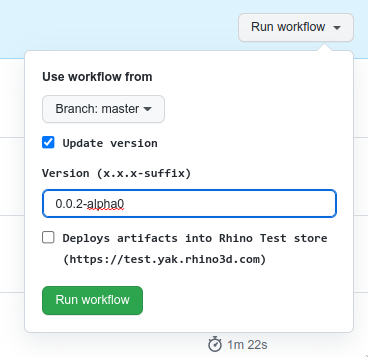
This action captures the process to deploy into Rhino store. It builds and tests the source tree with a new version and deploys the artifacts into Rhino store. This can be used if built tools are not installed on the local machine.
Design Notes
StrucEng Lib Plugin implements a MVVM pattern to separate UI boiler plate code from presentation and business logic. Since UI code is described in C#, it is a key goal to keep UI code as simple and straight forward as possible.
To unify code, we align with the following key decisions:
- Eto components are described in C#. A view containing constructions of Eto component is suffixed with View.
- Eto components in View classes use bindings to sync their state with a ViewModel.
- If an action is not complicated, a ViewModel may implement it directly with a RelayCommand. Otherwise the action is implemented in a class prefixed with Exec. Action classes inherit from CommandBase.
- Every ViewModel inherits from StrucEngLib#ViewModelBase and is suffixed with ViewModel.
- Where possible, every View contains a corresponding ViewModel class.
- A ViewModel is instantiated first and typically stored for later access in a shared context class. A ViewModel is then passed via constructor when instantiating a View class.
- There are two ways to sync model state with view model state: Classes (for instance those for LinFE) sync view model state on every change to their corresponding model class. This is a decision up to each class. To unify sync, a ViewModel may choose to implement ViewModelBase#UpdateModel and ViewModelBase#UpdateViewModel to sync state. These methods are called after init and before code emit.
Updating Sandwich Model
The dependency installer will download the latest state of SandwichModel located in branch strucenglib_plugin. Any changes committed to this branch will be used upon reinstallation of dependency with dependency installer.